Calendar 2024 Editable Template Guide
Organizing a year requires more than just knowing the dates; it demands a system that aligns with your workflow, brand identity, and personal aesthetic. Whether you are a marketing director preparing promotional materials for clients or a freelancer trying to keep track of billable hours, the right calendar template can save significant time. The Calendar 2024 Editable template offers a versatile solution designed for both corporate environments and individual creative projects. By providing a fully customizable foundation, this resource allows users to bypass the tedious initial setup of design software and focus immediately on content and styling.
Understanding the Template Structure
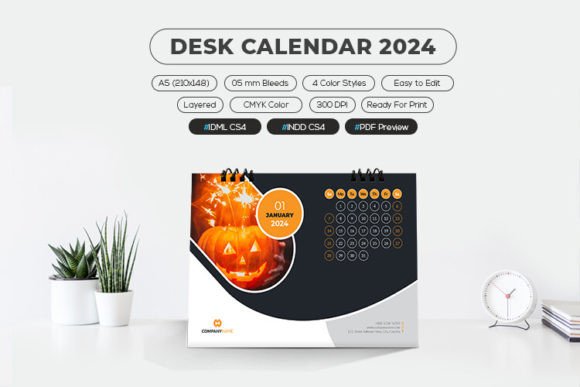
At its core, this template is built for precision and flexibility. It is sized at A5 (210×148 mm), a compact yet readable format ideal for desk calendars. The inclusion of a 5 mm bleed ensures that when the calendar is printed professionally, there are no unsightly white edges if the cut is slightly off-register. With a resolution of 300 DPI in CMYK color mode, the file is print-ready, meeting the standard requirements for high-quality commercial printing.
The technical specifications cater to a wide range of software proficiency. The package includes Adobe InDesign files (.INDD CS4 and IDML CS4), making it accessible to users with older versions of the software as well as those on the latest updates. Additionally, a PDF preview and a help file are included to guide users through the editing process. One notable feature is the use of only free fonts, which eliminates licensing headaches and ensures that the design remains consistent regardless of where it is opened or shared.
Why Professionals and Businesses Value Precision
For corporate companies and small business owners, a desk calendar is often more than a personal organizer; it is a branding tool. When you distribute a Calendar 2024 Editable to clients or employees, it serves as a constant reminder of your brand throughout the year. The ability to customize every element means you can insert your company logo, brand colors, and key corporate holidays seamlessly.
Marketing professionals, in particular, benefit from the four distinct color styles included in the template. This variety allows for A/B testing of designs or the creation of different versions for various departments or client tiers. The well-organized layers in the InDesign file mean that a graphic designer can quickly swap out images or adjust text without disrupting the underlying grid structure. This efficiency translates to cost savings, as less billable hours are spent on routine layout adjustments.
Furthermore, the option to choose whether the week starts on Sunday or Monday is crucial for international businesses. While some regions adhere to the traditional Sunday start, many European and Asian markets prefer Monday. Having both options available in the same template ensures that the final product respects local cultural norms, enhancing the professional reception of the material.
Creativity and Flexibility for Designers
Graphic designers and creative freelancers often look for templates that serve as a strong starting point rather than a rigid constraint. The Calendar 2024 Editable template supports this need by offering full editability. Because the layers are logically named and structured, designers can easily hide or show elements, such as specific month covers or decorative graphics, to suit their creative vision.
The use of free fonts is a significant advantage for creators who collaborate with clients. It ensures that if a client opens the file on their machine, the typography will not break due to missing font licenses. This reliability reduces friction in the approval process and allows the designer to focus on the visual impact rather than technical troubleshooting. The CMYK color profile ensures that what is seen on screen closely matches the final printed product, which is vital for maintaining design integrity.
Practical Utility for Educators and Planners
Educators and academic coordinators have unique scheduling needs that differ from the corporate world. Their year revolves around semesters, exam periods, and holiday breaks. An editable calendar allows them to highlight these critical dates clearly. For instance, a teacher might use the template to create a classroom calendar that marks project deadlines and school events, using the different color styles to differentiate between types of activities.
The A5 size is particularly practical for educational settings. It is large enough to be read from a distance when placed on a desk but small enough to fit into standard planners or binders. The ability to start the week on either Sunday or Monday allows educators to align the calendar with their specific school district’s scheduling conventions. By customizing the template, they can create a visual aid that helps students manage their time more effectively.
Personal Organization for Hobbyists and Consumers
On a personal level, hobbyists and consumers use calendars to track everything from fitness goals to social events. The Calendar 2024 Editable template offers a level of customization that pre-printed store-bought calendars cannot match. A photography enthusiast, for example, could use the template to create a personalized desk calendar featuring their own best shots for each month. The high-resolution 300 DPI setting ensures that their photos print sharply and vibrantly.
For individuals who are new to design software, the inclusion of a help file and the use of standard, free fonts lower the barrier to entry. Beginners can experiment with layout and color without the fear of making irreversible mistakes, as the layered structure allows for easy undoing and adjustment. This learning value is significant, as it provides a safe environment to develop basic design skills while producing a useful end product.
Evaluating the Fit for Your Needs
When deciding if this template is right for your project, consider your primary goal. If speed and ease of use are your priorities, the pre-structured layers and free fonts will streamline your workflow. If quality and professional presentation are paramount, the 300 DPI CMYK specification and bleed settings ensure a polished final product. For those focused on creativity, the four color styles and full editability provide the canvas needed for original expression.
- For Corporate Use: Focus on brand consistency and the ability to toggle between Sunday/Monday starts for global teams.
- For Designers: Leverage the organized layers and IDML compatibility for efficient client workflows.
- For Educators: Utilize the A5 format and customizable dates to align with academic schedules.
- For Personal Use: Take advantage of the free fonts and easy editing to create unique, photo-based calendars.
It is important to note that preview images are not included in the download, meaning the visual appeal relies entirely on your own content and design choices. This absence of pre-loaded imagery encourages originality and ensures that the final calendar is truly unique to your needs. Whether you are creating a single copy for your desk or hundreds for a corporate giveaway, the Calendar 2024 Editable template provides the structural integrity and flexibility required for a successful project.
Final Thoughts on Customization
In a digital age where screens dominate our attention, a physical desk calendar offers a tangible way to organize time. The Calendar 2024 Editable template bridges the gap between professional design standards and user-friendly customization. By understanding the features—such as the bleed settings, color modes, and font choices—you can make informed decisions about how to best utilize this resource. Regardless of your skill level or industry, the ability to tailor a calendar to your specific context adds value to your daily planning and professional presentation.