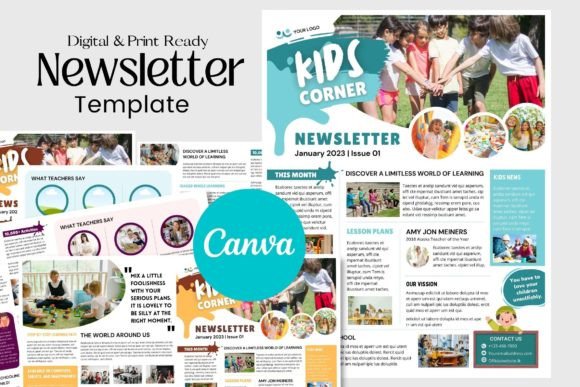
Canva Newsletter Template for Kids: A Practical Guide for Busy Creators and Educators
Creating engaging content for children is a unique challenge. It requires a balance of visual appeal, readability, and fun, all while maintaining a professional structure that parents or guardians can trust. For many educators, parents, and small business owners, designing a newsletter from scratch feels like a monumental task. This is where a Canva Newsletter Template for Kids becomes an invaluable asset. It is not just a pre-designed layout; it is a strategic starting point that bridges the gap between creative vision and practical execution.
This digital tool offers a self-editable framework that allows you to customize colors, fonts, and images to suit specific publication needs. Whether you are running a preschool, managing a community youth group, or launching a children’s activity blog, understanding how to leverage this template can save hours of design time while ensuring your final product looks polished and professional.
Why Pre-Designed Layouts Matter in Children’s Communication
Children respond differently to information than adults do. They are drawn to bright colors, playful illustrations, and clear, segmented layouts. A standard corporate newsletter template often fails to capture their attention or convey the right tone. A template specifically tailored for kids includes pre-designed elements such as graphics, illustrations, and layouts that resonate with younger audiences.
For the creator, the primary benefit is efficiency. Instead of spending hours searching for appropriate clip art or trying to align text boxes perfectly, you start with a foundation that already works. The Canva Newsletter Template for Kids allows you to focus on the content—the stories, updates, and announcements—rather than the mechanics of design. This shift in focus is crucial for educators and parents who are often juggling multiple responsibilities and need to communicate effectively without burning out.
Real-World Use Cases for Different Users
The versatility of this template means it serves a wide range of users. Here is how different groups can apply it in their daily workflows:
Educators and School Administrators
Teachers and school administrators frequently need to send weekly or monthly updates to parents. These newsletters might include classroom highlights, upcoming event dates, or homework reminders. Using a kids’ newsletter template ensures that the communication feels warm and inviting. For example, a kindergarten teacher can use the template to showcase student artwork alongside important notices. The playful design encourages parents to read through the entire document, increasing engagement and ensuring critical information is not missed.
Parents and Home Schoolers
For families involved in homeschooling co-ops or large extended family networks, a newsletter can be a wonderful way to share milestones and learning progress. A parent might use the template to create a monthly "Family Learning Journal" that is shared with grandparents or other relatives. The ability to add personal photos and change font styles allows for a highly personalized touch that strengthens family connections.
Small Business Owners and Entrepreneurs
If you run a children’s party planning business, a tutoring service, or a kids’ coding club, regular communication with clients is key to retention. A professionally designed newsletter helps build brand authority. You can use the template to highlight success stories, introduce new services, or offer seasonal discounts. The instant download feature means you can react quickly to market trends or last-minute changes in your schedule, keeping your audience informed in real-time.
Content Creators and Bloggers
Digital creators who focus on parenting, education, or child development often use newsletters to nurture their email lists. A visually appealing template increases open rates and click-throughs. By customizing the colors to match their brand identity, bloggers can create a seamless experience from their website to their inbox. The user-friendly platform ensures that even those with no graphic design background can produce high-quality visuals that stand out in a crowded inbox.
Key Features That Drive Usability
The effectiveness of the Canva Newsletter Template for Kids lies in its technical flexibility. It is an instant download, meaning there is no waiting period for shipping or complex software installation. Since it works directly in your computer browser, you can access it from any device with an internet connection. This cloud-based approach is particularly beneficial for users who work on the go or switch between devices.
The template comes in two standard sizes: A4 and US Letter. This dual-format support ensures that whether you are printing at home or using a local print shop, the layout will remain intact. No more worrying about margins cutting off text or images appearing pixelated. The ability to print physically also opens up opportunities for tangible distribution, such as handing out flyers at community centers or including printed newsletters in take-home folders for students.
Customization is straightforward. You can add or remove text boxes, change font styles to improve readability, and swap out images to reflect current themes. For instance, during Halloween, you might replace standard illustrations with spooky yet friendly graphics. In December, you could switch to a winter color palette. This adaptability ensures that your newsletter remains fresh and relevant throughout the year.
What to Consider Before You Start Editing
While the template simplifies the design process, successful implementation requires some forethought. Before you begin editing, consider your audience’s preferences. Are they more responsive to bold, primary colors, or softer pastels? Understanding your demographic will help you make smarter design choices within the template.
Also, think about the volume of content you plan to include. A cluttered newsletter can overwhelm young readers and busy parents alike. Use the pre-designed sections to organize information logically. Highlight the most important updates first, and use visuals to break up large blocks of text. Remember, the goal is clarity and engagement, not just aesthetic appeal.
Another consideration is brand consistency. If you are using this for a business or educational institution, ensure that the fonts and colors you choose align with your existing branding guidelines. Canva’s extensive library allows you to upload your own logos and brand assets, making it easy to maintain a cohesive look across all your communications.
Maximizing the Value of Your Template
To get the most out of your Canva Newsletter Template for Kids, treat it as a living document. Save multiple versions for different occasions or seasons. Create a folder in your Canva account where you store edited drafts, so you can easily reuse successful layouts in the future. This practice not only saves time but also helps you develop a recognizable style that your audience will come to appreciate.
Additionally, take advantage of Canva’s collaborative features. If you work with a team, you can invite colleagues to edit the newsletter simultaneously. This is particularly useful for schools where multiple teachers contribute content, or for businesses where marketing and operations teams need to align on messaging. Real-time collaboration reduces errors and speeds up the approval process.
Ultimately, the value of this template lies in its ability to empower you. It removes the technical barriers to creating professional-quality content, allowing you to focus on what matters most: connecting with your audience. Whether you are informing parents, engaging students, or promoting your services, a well-designed newsletter can significantly enhance your communication efforts. By leveraging the ease and flexibility of this Canva template, you can create impactful, visually appealing newsletters that resonate with children and adults alike.