Crafting Personalized Memories with the Blue Valentine’s Day Photoshop Template
Valentine’s Day is often associated with grand gestures, expensive dinners, and store-bought chocolates. However, in an era where digital saturation is high, tangible, personalized gifts carry a weight that mass-produced items simply cannot match. This is where the Blue Valentine’s Day Photoshop Template becomes an invaluable tool for creatives, parents, teachers, and anyone looking to add a heartfelt touch to their holiday celebrations. By leveraging this fully layered digital asset, you can transform ordinary photographs into charming, wallet-sized keepsakes that resonate on a personal level.
The appeal of this specific template lies not just in its aesthetic charm but in its functional versatility. It is designed to be delightful yet practical, offering a seamless bridge between digital design and physical printing. Whether you are a seasoned graphic designer or a hobbyist using Photoshop Elements for the first time, understanding how to maximize this template can elevate your gifting strategy significantly.
The Power of Wallet-Sized Keepsakes
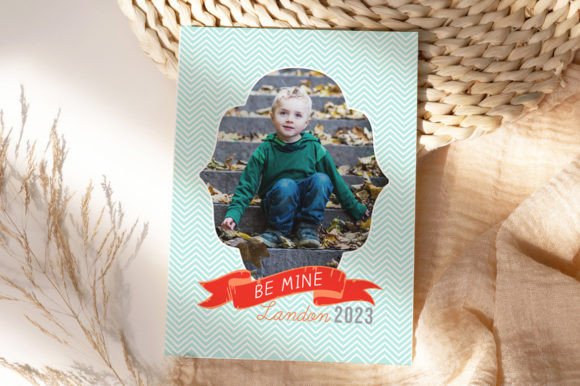
In a world dominated by smartphone screens, physical photos have regained their status as cherished artifacts. The standard wallet size of 2.5″ x 3.5″ is iconic for a reason. It is small enough to fit into a purse, a child’s lunchbox, a teacher’s desk drawer, or a partner’s wallet, yet large enough to capture facial expressions and details clearly. The Blue Valentine’s Day Photoshop Template is optimized specifically for this dimension, ensuring that your final product looks professional regardless of where it ends up.
Unlike square social media posts that often get lost in the scroll, a rectangular wallet photo feels intentional. It mimics the classic trading card or traditional portrait format, giving it a timeless quality. When you use this template, you are not just sending a image; you are providing a physical object that can be held, touched, and displayed. This tactile experience enhances the emotional connection of the gift, making it far more memorable than a digital e-card.
Design Flexibility and Customization
One of the primary concerns when adopting any digital template is rigidity. Will it fit my photo? Can I change the colors to match my brand or personal preference? The Blue Valentine’s Day Photoshop Template addresses these concerns head-on by being fully layered. This structural integrity allows for extensive customization without compromising the design’s balance.
Color and Text Modifications
The "Blue" in the title suggests a cool, calming, or perhaps classic nautical or winter-themed palette, but this is merely the starting point. Because the file is fully layered, you have complete control over the color scheme. If your recipient prefers warm tones, pastels, or bold primaries, you can adjust the hue and saturation of the background elements with just a few clicks. This adaptability ensures that the template serves a wide variety of aesthetic preferences, from minimalist modern to whimsical and playful.
Text modification is equally straightforward. The template includes designated areas for names, dates, or short messages. Since all fonts used in the design are free to download, you are not locked into expensive licensing agreements. The accompanying font download info ensures that you can replicate the exact look of the preview or swap in your own typography if desired. This freedom allows you to tailor the message specifically to the recipient, whether it’s a simple "Happy Valentine's Day" or a more personal inside joke.
Photo Integration via Clipping Masks
For those unfamiliar with advanced Photoshop techniques, the concept of clipping masks might sound intimidating. However, this template simplifies the process dramatically. The design utilizes pre-set clipping masks, which act as windows for your images. You simply drag and drop your photo into the designated layer, and it automatically conforms to the shape and boundaries of the design frame.
This feature is crucial for maintaining a professional look. It prevents common amateur mistakes such as stretched images or misaligned borders. Whether you are using full Adobe Photoshop or the more accessible Photoshop Elements, the workflow remains intuitive. This compatibility makes the Blue Valentine’s Day Photoshop Template an excellent choice for users with varying levels of technical expertise.
Printing Considerations and Best Practices
Creating a beautiful digital file is only half the battle; the final output depends heavily on how it is printed. The Blue Valentine’s Day Photoshop Template is engineered with print production in mind. The designs extend to the full rectangle, a critical detail for professional printing. This "bleed" area ensures that when the cards are cut, there are no unsightly white edges, even if the cutting machine shifts slightly.
Rounded vs. Square Corners
A unique advantage of this template is its compatibility with both rounded and square corner prints. Many modern print labs offer rounded corners as a premium finish, which adds a soft, polished look to wallet-sized photos. Alternatively, square corners provide a classic, sharp appearance. Because the design extends to the edges, you can choose either option without worrying about cutting off important design elements or text. This flexibility allows you to match the finish to the vibe of the photo—rounded for a softer, more romantic feel, or square for a crisp, modern aesthetic.
Home Printing vs. Professional Labs
You have two primary avenues for bringing this template to life: home printing or professional print labs.
- Home Printing: If you have a high-quality inkjet or laser printer, you can print these templates on heavy cardstock or photo paper. This method offers immediate gratification and total control over the quantity. It is ideal for last-minute gifts or when you want to experiment with different paper textures.
- Professional Print Labs: For a truly durable and vibrant result, sending your files to a professional lab is recommended. Most labs that offer wallet-sized printing will accept the standard 2.5″ x 3.5″ dimensions provided by this template. The color accuracy and paper quality of professional labs often surpass home setups, resulting in a gift that feels store-bought in quality but personalized in content.
Regardless of your choice, ensure that your printer settings are configured for high-quality photo output. Check that your color profile matches the printer’s capabilities to avoid unexpected shifts in the blue tones or skin tones in your photographs.
Ideal Use Cases and Scenarios
The versatility of the Blue Valentine’s Day Photoshop Template opens up numerous creative possibilities beyond the traditional couple’s exchange. Here are several scenarios where this template shines:
- School Classroom Exchanges: Parents often struggle to find unique, non-candy alternatives for school Valentine exchanges. A wallet-sized photo of the child with a friendly message is a hit among classmates and teachers alike. It is inclusive, personal, and avoids dietary restrictions.
- Long-Distance Relationships: For partners separated by distance, a physical photo serves as a tangible reminder of connection. Mailing a set of these wallet photos can bridge the gap between digital communication and physical presence.
- Teacher and Caregiver Appreciation: A small token of appreciation featuring a photo of the student or child with a thank-you note is a thoughtful way to acknowledge the hard work of educators and caregivers. The wallet size fits easily into a card or a small gift bag.
- Pet Lovers: Incorporate your furry friends into the design. A photo of a pet with a playful Valentine’s message is universally appealing and adds a layer of humor and warmth to the gift.
Getting Started: A Quick Workflow Guide
To ensure you get the best results from the Blue Valentine’s Day Photoshop Template, follow this streamlined workflow:
First, download the package and extract the .psd files. Install the free fonts included in the download folder to ensure the text renders correctly. Open the template in Photoshop or Photoshop Elements. Locate the layer marked for photo insertion and double-click the thumbnail to open the smart object or use the clipping mask as instructed in the included guide.
Select a high-resolution photo. Ideally, the image should be well-lit and focused, as small prints can reveal blurriness more easily than large posters. Drag your photo into the template, adjust the positioning to frame the subject perfectly, and save. Next, customize the text layers with your desired message. Take a moment to review the color balance; if the blue tones overpower the skin tones, adjust the opacity or hue of the background layers.
Finally, export the file as a high-quality JPEG or PNG, ensuring the resolution is set to 300 DPI for crisp printing. Send the file to your chosen print lab or load it into your home printer. With these steps, you transform a digital file into a lasting memory.
The Blue Valentine’s Day Photoshop Template is more than just a design asset; it is a conduit for connection. In a fast-paced digital world, taking the time to curate, customize, and print a physical photo demonstrates care and effort. By utilizing this fully layered, easy-to-use template, you create a gift that is not only visually stunning but emotionally resonant. Whether for a loved one, a friend, or a colleague, these wallet-sized treasures offer a perfect blend of modern convenience and old-school charm.