Evaluating the Knight 3D Text Effect for Professional Design Workflows
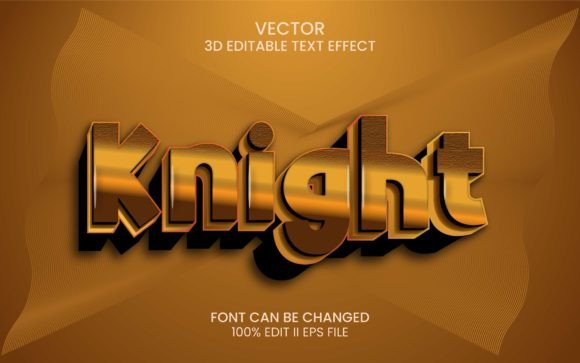
In the fast-paced environment of modern graphic design, efficiency often dictates the quality of output as much as raw talent does. Designers, marketers, and content creators are constantly seeking tools that bridge the gap between high-end visual aesthetics and rapid production timelines. One such resource that has garnered attention in creative communities is the Knight 3D Text Effect. This asset is not merely a static image but a dynamic set of Adobe Illustrator text effects designed to streamline the creation of bold, dimensional typography. For professionals who need to deliver impactful visuals without spending hours on manual extrusion and lighting adjustments, understanding the utility and limitations of this tool is essential.
Understanding the Core Functionality
The Knight 3D Text Effect operates within the Adobe Illustrator ecosystem, leveraging the software’s powerful Graphic Styles panel. At its core, this product is a pre-configured set of styles that apply complex three-dimensional attributes to standard vector text or shapes. The primary value proposition here is immediacy. Instead of manually constructing 3D geometry, adjusting light sources, and mapping textures—a process that can be technically demanding and time-consuming—users can apply these effects with a single click.
The mechanism is straightforward yet effective. Once the graphic styles are loaded into your Illustrator library, you simply type your desired text or draw a shape. By selecting the object and clicking on the specific "Knight" style in the Graphic Styles menu, the software instantly renders the 3D effect. This non-destructive workflow allows for significant flexibility. Because the underlying object remains editable, you can change the font, adjust the kerning, or modify the shape at any time, and the 3D effect will update automatically. This responsiveness is crucial for iterative design processes where client feedback often requires multiple revisions.
Key Features and Technical Specifications
To assess whether this tool fits into your professional toolkit, it is important to look beyond the marketing imagery and examine the technical specifications. The Knight 3D Text Effect package is designed with organization and ease of use in mind. Here are the critical components included in the download:
- Editable Text and Fonts: The effect supports 100% editable text, meaning you are not locked into a specific rasterized outcome. It utilizes free fonts, which removes licensing barriers for commercial projects.
- Well-Organized Layers: For designers who prefer to deconstruct effects to understand their construction or make granular adjustments, the file structure is clean and logical.
- RGB Color Profile: The effects are optimized for RGB color spaces, making them ideal for digital media, web graphics, social media content, and screen-based presentations.
- Comprehensive Documentation: A "Read Me" text file is included, providing clear instructions and direct download links for the necessary free fonts. This attention to detail reduces friction during the initial setup phase.
- File Formats: The package includes one PSD (Photoshop) file, one JPEG preview for quick reference, and the primary Illustrator assets.
The inclusion of a PSD file suggests that while the primary workflow is vector-based in Illustrator, there is consideration for users who may want to integrate these elements into broader Photoshop compositions. However, the strength of this tool lies in its vector nature, ensuring scalability without loss of quality.
Practical Applications and Real-World Performance
Who benefits most from the Knight 3D Text Effect? The answer largely depends on the volume and type of design work you produce. For freelance graphic designers, this tool can significantly reduce billable hours spent on routine typographic treatments. Imagine creating a series of YouTube thumbnails, social media headers, or digital ad banners where consistent, bold typography is required. Using a preset style ensures brand consistency across all assets while cutting down production time by potentially 50% or more.
Marketers and small business owners who handle their own in-house design will also find considerable value. Often, these individuals lack the advanced technical skills required to manipulate 3D tools in Illustrator or Photoshop. The Knight 3D Text Effect democratizes access to professional-grade 3D typography, allowing non-specialists to achieve results that look polished and credible. This can elevate the perceived value of their marketing materials without requiring a steep learning curve.
In terms of real-world performance, the effect holds up well in digital contexts. The RGB color profile ensures vibrant, screen-accurate colors. However, it is important to note that because this is a screen-optimized effect, it may not be suitable for high-resolution print campaigns requiring CMYK color separation without additional conversion and adjustment steps. For web designers, bloggers, and digital publishers, however, it is an excellent fit.
Usability and Customization Potential
One of the strongest aspects of this asset is its balance between preset convenience and customization potential. While "one-click" solutions are appealing, they often suffer from rigidity. The Knight 3D Text Effect avoids this trap by being fully editable. If the default lighting angle does not suit your composition, you can dive into the appearance panel and tweak the 3D extrude settings. If the color scheme needs to align with a specific brand palette, the vector nature of the object allows for easy recoloring.
The use of free fonts is another thoughtful inclusion. In professional environments, font licensing can be a legal minefield. By bundling the effect with freely available typefaces, the creator removes a common obstacle. However, experienced designers will likely want to swap these out for proprietary brand fonts. The system accommodates this seamlessly. You can replace the placeholder text with your licensed font, and the 3D effect will retain its integrity, provided the new font has similar structural characteristics.
It is worth mentioning that while the layers are well-organized, achieving a truly unique look may require some experimentation. Relying solely on the default preset might result in designs that look similar to other users’ work. To maximize the value of the Knight 3D Text Effect, users should treat it as a starting point rather than a final solution. Combining the 3D effect with additional texture overlays, background elements, or secondary lighting effects in post-production can help create a distinct visual identity.
Limitations and Considerations
No tool is without its limitations, and honest evaluation requires acknowledging them. First, the Knight 3D Text Effect is dependent on Adobe Illustrator. Users working exclusively in other design ecosystems, such as Affinity Designer or CorelDRAW, will not be able to utilize this asset directly. Second, while the effect is labeled as "3D," it is technically a simulated 3D effect using vector extrusion and shading. It does not offer the full rotational freedom or realistic ray-traced lighting of dedicated 3D software like Blender or Cinema 4D. For projects requiring photorealistic rendering or complex camera movements, this tool will fall short.
Additionally, complex 3D effects in Illustrator can sometimes strain system resources. If you are working on older hardware or attempting to apply this effect to extremely intricate shapes with thousands of anchor points, you may experience lag. It is best suited for bold, relatively simple typography or shapes rather than highly detailed illustrations.
Final Verdict: Is It Worth Your Time?
The Knight 3D Text Effect represents a practical investment for designers who prioritize efficiency without sacrificing visual impact. It is particularly valuable for those working in digital media, where speed and scalability are paramount. The combination of easy editing, organized files, and free font usage makes it accessible to both seasoned professionals and novice creators.
If your workflow involves frequent creation of headlines, logos, or promotional graphics for screens, this tool can streamline your process significantly. It allows you to maintain a high standard of visual quality while reducing the technical overhead associated with 3D design. However, if your work primarily involves print media or requires hyper-realistic 3D rendering, you may need to look toward more specialized software solutions. Ultimately, the Knight 3D Text Effect is a solid, reliable asset that delivers on its promise of easy, editable, and professional-looking 3D typography for the modern digital designer.