Cinematic Christal Text Effects for Illustrator
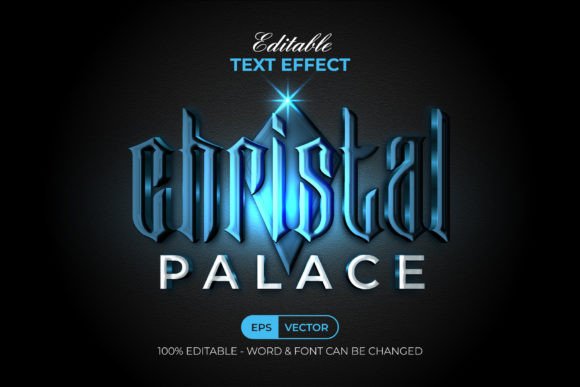
In the fast-paced world of digital design, first impressions are often dictated by typography. Whether you are crafting a movie poster, designing a luxury brand logo, or creating social media graphics, the way your text looks can make or break the visual impact. This is where specialized tools like the Christal Text Effect Cinematic Style come into play. Rather than spending hours manually layering gradients, shadows, and glows in Adobe Illustrator, designers can now achieve high-end, cinematic aesthetics with just a few clicks. This resource is not merely a font; it is a sophisticated collection of graphic styles designed to transform ordinary text into eye-catching visual statements.
Understanding the Christal Text Effect Workflow
Many designers mistakenly believe that achieving complex text effects requires advanced manual manipulation of vector paths or extensive knowledge of blending modes. While that is one approach, it is often time-consuming and difficult to replicate consistently. The Christal Text Effect Cinematic Style simplifies this process significantly by leveraging Adobe Illustrator’s native Graphic Styles panel.
When you purchase and install this set, you are not installing a new typeface on your operating system. Instead, you are adding a library of pre-configured styles to your Illustrator workspace. The workflow is intuitive: you simply type your desired text or create a shape, select it, and click on the preferred style from the Graphic Styles menu. The effect applies instantly, wrapping your content in a polished, professional finish. This non-destructive method means you can edit the text at any time without losing the effect, offering unparalleled flexibility for iterative design processes.
Key Features and Technical Specifications
What sets this particular text effect pack apart is its balance between aesthetic complexity and technical ease of use. Here are the core characteristics that make it a valuable addition to any designer’s toolkit:
- Instant Application: The effects are ready to use directly from the Graphic Styles menu, eliminating the need for complex layer management.
- Fully Editable: Since the underlying structure remains vector-based, you can change the copy, adjust the font, or modify the shape while retaining the cinematic styling.
- Organized Structure: The files come with well-organized layers, making it easy to understand how the effects are constructed if you wish to customize them further.
- RGB Color Profile: Optimized for digital screens, these effects are perfect for web graphics, video thumbnails, and digital advertising.
- Free Font Compatibility: The package includes a "Read Me" text file with download links for the free fonts used in the previews, ensuring you can replicate the exact look without additional costs.
The package includes one EPS file, one AI file, a JPEG preview for quick reference, and the instructional text file. It is compatible with Adobe Illustrator CC and above, ensuring that most modern creative professionals can integrate it seamlessly into their existing workflows.
Practical Applications Across Industries
The versatility of the Christal Text Effect Cinematic Style allows it to serve a wide range of creative and commercial needs. Because the aesthetic is inherently dramatic and polished, it works best in contexts where you want to convey luxury, excitement, or high production value.
Branding and Marketing
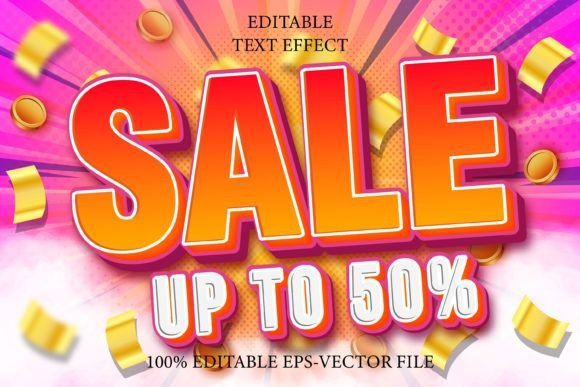
For marketers and entrepreneurs, standing out in a crowded digital feed is crucial. These text effects can elevate simple promotional banners, email headers, or social media posts. Imagine a sale announcement for a fashion brand; applying a cinematic crystal effect to the word "SALE" draws immediate attention and suggests premium quality. Similarly, freelancers can use these styles to create striking portfolio headers that demonstrate their attention to detail and modern design sensibilities.
Entertainment and Media
As the name suggests, the "Cinematic" aspect of these styles makes them ideal for the entertainment industry. Video editors and YouTubers can use the exported PNGs or SVGs for thumbnail text, ensuring high click-through rates. Film students and independent creators can utilize these effects for title sequences, event posters, or promotional flyers for film festivals. The glossy, refractive qualities mimic the look of high-budget movie titles, adding a layer of professionalism to independent projects.
Educational and Corporate Presentations
Even in corporate or educational settings, visual engagement matters. Educators creating online course materials can use these effects to highlight key module titles or important concepts, making the content more memorable. Business consultants can enhance their pitch decks by using subtle variations of these styles for section dividers or key statistic highlights, ensuring their presentations look polished and modern rather than generic.
Maximizing Efficiency and Creativity
One of the most significant benefits of using pre-made graphic styles like the Christal Text Effect Cinematic Style is the conservation of time. In a professional environment, billable hours matter. Spending thirty minutes tweaking a gradient mesh for a single headline is rarely efficient when a client needs a rapid turnaround. By using this tool, you reduce that task to seconds, allowing you to focus on broader design composition, client communication, and strategy.
Moreover, these effects encourage experimentation. When the technical barrier to entry is low, designers are more likely to try different typographic arrangements. You might find that a short, punchy headline looks better with a heavy bold font, while a longer quote benefits from a lighter, elegant serif. Because the effect is easily editable, you can test multiple variations quickly without starting from scratch each time.
Considerations for Best Results
While the Christal Text Effect Cinematic Style is user-friendly, there are practical considerations to keep in mind to ensure optimal results. First, remember that these effects are designed in RGB color mode. If you are preparing files for print, you will need to convert colors carefully or use the vector shapes as a base for creating CMYK-compatible versions manually. For digital use, however, they are ready to go.
Secondly, legibility is key. Cinematic effects often involve gloss, transparency, and intricate details. Ensure that there is sufficient contrast between the text and the background. These styles work best on darker or solid backgrounds where the light-reflecting qualities of the "crystal" effect can pop. Avoid placing them over busy, high-contrast images unless you add a solid backing or shadow to separate the text from the background noise.
Finally, take advantage of the included documentation. The "Read Me" file provides essential links to the free fonts used in the demos. Using the recommended fonts will help you achieve the exact look shown in the previews, though you are free to experiment with other typefaces to match your specific brand identity.
In conclusion, the Christal Text Effect Cinematic Style is more than just a decorative add-on; it is a productivity tool that bridges the gap between amateur experimentation and professional polish. By integrating this set into your Adobe Illustrator workflow, you gain the ability to produce high-quality, cinematic typography efficiently, freeing up your creative energy for the strategic aspects of design. Whether you are a seasoned agency professional or a hobbyist looking to elevate your personal projects, this resource offers a straightforward path to stunning visual results.